/secret "staging DB password"
Stop pasting passwords in Slack.
Credentials in chat history are a breach waiting to be searched. Just Secrets swaps the paste for an encrypted link that works once — then burns.
 Just SecretsAPP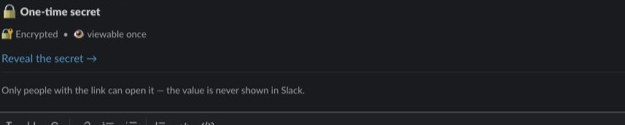
How it works
Three beats, zero residue
Type the secret
/secret "staging DB password"
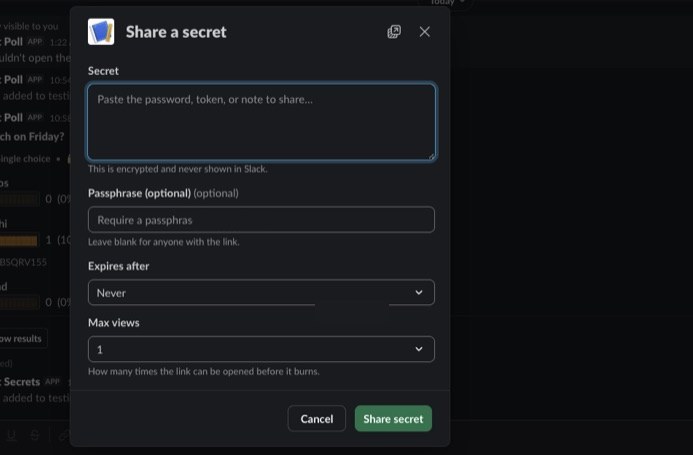
Type /secret with the value, or bare /secret to open the form and set a passphrase or expiry window.
Just Secrets posts a burn link
Instead of the value, the channel or DM gets an encrypted, one-time card. The secret itself never touches chat history.
Read once, then it’s ash
The recipient reveals it once. The link refuses every later visit — and expires on its own if never opened.
Features
The product, not a mockup
Every image below is Just Secrets running in a real Slack workspace — captured, not composed.
Create
One form, three knobs
The secret, an optional passphrase the recipient must enter, and an expiry window. Defaults are safe; every knob is yours to turn.
Burn after reading
Opened once, then it’s ash
After the first reveal, the ciphertext is deleted and the card says so. Refreshes, forwards, and curious teammates get the burned notice — nothing else.
Just SecretsAPP
Encrypted at rest
Fernet encryption before the value ever hits storage. A leaked database backup yields ciphertext, not credentials.
Never in chat history
Slack stores the link, not the secret. Search the workspace all you like — the value isn’t there to find.
Minimal scopes
No message-history read, no admin rights. Secret values never appear in logs, ours or Slack’s.
Free. Unlimited. Self-hosted.
FreeEvery feature. No secret quotas.
UnlimitedShare as often as the job needs.
Self-hostedSecrets never leave your server.
FAQ
Asked and answered
Where do secrets actually live?
On your own server, encrypted at rest. Just Secrets is self-hosted — nothing transits a third-party SaaS, and nothing survives on ours because there is no ours.
What does “burned” mean?
The link works exactly once. After the first reveal the stored ciphertext is deleted, and every later visit gets the burned notice — including a refresh by the original reader.
Can I set an expiry?
Yes. Unopened secrets expire on the window you choose and return nothing afterwards. You can also destroy a secret manually before anyone opens it.
Does it read our messages?
No. Just Secrets runs on minimal Slack scopes and never reads channel history. Secret values never appear in logs.
How do I install?
Click "Add to Slack", review and grant the requested scopes, then invite the bot to the channels where you want to share secrets with /invite @Just Secrets.
Is it really free?
Yes — unlimited secrets, every feature, no per-seat pricing. Self-hosted, so there’s nothing to meter.